State Pattern, 主要作用在流程的狀態判斷, 有時候為了處理不同的狀態會透過switch case 或是
if else去判斷的所有的狀態值, 此時會造成程式太過於冗長, 就需要透過一些設計的方式來重新建構
例:我要去銀行辦信用卡, 需要寫一張申請單, 然後經過核可, 最後是申請結束.
以下範例為C#
A.首先創建一個委派用的抽像類別, state
public abstract class state
{
public abstract void nextStates(flw flows);
}
B.再創建流程動作
public class flw
{
private state states;
public flw()
{
states = new StartStates();
}
public void nextState()
{
states.nextStates(this);
}
public void setState(state state)
{
this.states = state;
}
}
C.每個流程的階段內容
public class StartStates : state //開始階段
{
public override void nextStates(flw flows)
{
flows.setState(new ApplyStates()); //將階段任務給至下一個階段
Console.WriteLine("提出申請");
}
}
public class ApplyStates : state //審核階段
{
public override void nextStates(flw flows)
{
flows.setState(new HRState());
Console.WriteLine("Check Process");
}
}
public class HRState : state //處理階段
{
public override void nextStates(flw flows)
{
flows.setState(new stopStates());
Console.WriteLine("結束流程");
}
}
public class stopStates: state //最後結束的階段
{
public override void nextStates(flw flows)
{
Console.WriteLine("結束流程");
}
}
範例2 : 透過delegation C#
using System;
using System.Collections.Generic;
using System.Linq;
using System.Text;
namespace DelegateAP
{
public class delegateNts
{
public delegate void ssN();
}
public class flw :delegateNts
{
public flw()
{ }
public void BusinessStepWork()
{
StartStates sstepBy= new StartStates ();
ssN NextSates ;
NextSates = sstepBy.nextStates;
NextSates += sstepBy.ApplyStatus;
NextSates += sstepBy.EndStatus;
NextSates.Invoke();
}
}
public class StartStates
{
public void nextStates()
{
Console.WriteLine("提出申請");
}
public void ApplyStatus()
{
Console.WriteLine("Check Process");
}
public void EndStatus()
{
Console.WriteLine("結束流程");
}
public void OverStatus()
{
Console.WriteLine("end less");
}
}
}
斷了線的小木偶 發表在 痞客邦 留言(0) 人氣(192)
Json是一種資料格式, 以下是參考網站(多國語系)
http://www.json.org/
在jQuery中有不同的傳輸方式(可參考http://api.jquery.com/jQuery.post/)
在這裡說明是aspx && jQuery的方式
事實上在aspx裡可以透過ashx或是apsx的頁面做資料的回傳
在程式內都標明了 "context.Response.ContentType = "text/plain";"
代表資料傳回為文字(直接連網址的話,會看到結果就像一個txt的文字檔呈現在瀏覽器上)
在apsx的頁面中(jQuery請自行學習, 在此不多說明)
<script type="text/javascript">
//這段是說明一個textbox (id = txtCR) 內容改變時, 呼叫getdata的method
$('#txtCR').change(function () {
getdata();
});
///
而在jQuery中對於ajax的資料呼叫格式如下:
$.post("呼叫的檔案路徑", json格式的值 , function(回傳的傳)
{判斷式}, "指明傳輸的格式");
程式碼如下:
function getdata() {
$.post("Handler.ashx", { crno: $("#txtCR").val() }, function(data) {
if (data != null) {
$("#HintString").text('Data_Exsited');
} else {
alert('No Data');
}
}, "json");
}
///
</script>
1、ashx的頁面
(致於如何在aspx的專案中加入.ashx的頁面,請按滑鼠右鍵選擇add new item 自已找!)
public class Handler : IHttpHandler {
public void ProcessRequest (HttpContext context) { //透過http (廢話)
context.Response.ContentType = "text/plain"; //標註頁面為text
string id2 = context.Request["crno"]; //接收ajax所傳過來的值
id2 = id2 + "Hello World";
factor = JsonPaser.JsonCreateDataFormat(ds);
//回傳也必需為json格式, 在此筆者是自行寫一段程式碼去編譯的
context.Response.Write(factor); //此動作為回傳
}
2、aspx頁面
在頁面部分,把所有HTML tag都清空,只留下第一行的Tag
<%@ Page Language="C#" AutoEventWireup="true" CodeFile="json.aspx.cs" Inherits="json" %>
然後在.cs頁面的Page_load中寫入
protected void Page_Load(object sender, EventArgs e)
{
if (!Request["crno"].Equals(""))
{
//取得變數ID
string id2 = Request["crno"].ToString();
id2 = id2 +"hello World";
//最後就是把撈出來的JSON字串Response.Write出來
Response.Write(id2);
}
}
斷了線的小木偶 發表在 痞客邦 留言(0) 人氣(812)
斷了線的小木偶 發表在 痞客邦 留言(0) 人氣(112)
C#有提供file.copy的方式對檔案做覆製貼上的功能
但有時想透過web-service或是WCF去傳輸檔案
此時就須要將檔案轉換成二位元的格式, 而WCF所接收的值只能是可序列化的值所以在做檔案傳輸的時候就需轉換檔案的格式
當然WCF有傳輸大小的限制(如何修改請看另一篇)
第一步當然是先有檔案基本資訊 (64base encode)
FileStream inFile = new System.IO.FileStream(FilePath, System.IO.FileMode.Open, System.IO.FileAccess.Read);
再做檔案的轉換 轉換成長格式(64位元的string)
byte[] binaryData = new Byte[inFile.Length];
long bytesRead = inFile.Read(binaryData, 0, (int)inFile.Length);
inFile.Close();
base64String = System.Convert.ToBase64String(binaryData, 0, binaryData.Length);
或是以下方式
using (FileStream reader = new FileStream(fileName, FileMode.Open))
{
byte[] buffer = new byte[reader.Length];
reader.Read(buffer, 0, (int)reader.Length);
return Convert.ToBase64String(buffer);
斷了線的小木偶 發表在 痞客邦 留言(0) 人氣(7,480)
Visual stdio.Net WCF的大小限制
基本上WCF在資料上的傳輸, 被限制在於只能使用可序列化的物件
其它像是arraylist, stringbulider...etc.等的object是不行的
(除非你可以把以上的物件全部轉為序列化物件), 而且又有大小的限制
相當的麻煩(其時也還好, 可能是筆者個人比較懶惰),
所以希望能夠將WCF的傳輸量放大的話需要更改web.config的檔案
原本的檔案如下:
<bindings>
<basicHttpBinding>
<binding name="BasicHttpBinding_IService1" closeTimeout="00:01:00"
openTimeout="00:01:00" receiveTimeout="00:10:00" sendTimeout="00:01:00"
allowCookies="true" bypassProxyOnLocal="false" hostNameComparisonMode="StrongWildcard"
maxBufferSize="65536" maxBufferPoolSize="524288" maxReceivedMessageSize="65536"
messageEncoding="Text" textEncoding="utf-8" transferMode="Buffered"
useDefaultWebProxy="true">
<readerQuotas maxDepth="32" maxStringContentLength="8192" maxArrayLength="16384"
maxBytesPerRead="4096" maxNameTableCharCount="16384" />
<security mode="None">
<transport clientCredentialType="None" proxyCredentialType="None"
realm="" />
<message clientCredentialType="UserName" algorithmSuite="Default" />
</security>
</binding>
</basicHttpBinding>
</bindings>
主要更改的是maxBufferSize="65536", maxReceivedMessageSize="65536"還有
<readerQuotas maxDepth="32" maxStringContentLength="8192" maxArrayLength="16384"
maxBytesPerRead="4096" maxNameTableCharCount="16384" />
這三個項目, 只要將此三個項目內的數字改成你想要的大小即可, 如下
<bindings>
<basicHttpBinding>
<binding name="BasicHttpBinding_IService1" closeTimeout="00:01:00"
openTimeout="00:01:00" receiveTimeout="00:10:00" sendTimeout="00:01:00"
allowCookies="true" bypassProxyOnLocal="false" hostNameComparisonMode="StrongWildcard"
maxBufferSize="655360000" maxBufferPoolSize="524288" maxReceivedMessageSize="655360000"
messageEncoding="Text" textEncoding="utf-8" transferMode="Buffered"
useDefaultWebProxy="true">
<readerQuotas maxDepth="6553500" maxStringContentLength="2147483647"
maxArrayLength="6553500" maxBytesPerRead="6553500" maxNameTableCharCount="6553500" />
<security mode="None">
<transport clientCredentialType="None" proxyCredentialType="None"
realm="" />
<message clientCredentialType="UserName" algorithmSuite="Default" />
</security>
</binding>
</basicHttpBinding>
</bindings>
斷了線的小木偶 發表在 痞客邦 留言(0) 人氣(1,064)
Reporting Server有提供一些WebService讓使用者自行開發客製化的Web或是AP的界面
在這裡就試著介紹一些常用到的WS函數 (此處只介紹程式該如何寫, 更詳細的物件屬性請至MSDN上查詢)
(PS.參考來自官方文件:http://msdn.microsoft.com/zh-tw/library/cc282570.aspx)
環境:ReportingServer 2005 -請注意版本
斷了線的小木偶 發表在 痞客邦 留言(0) 人氣(163)

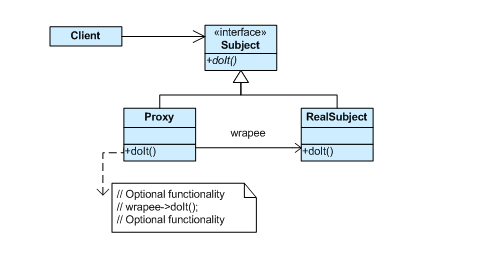
代理模式uml圖
//先產生一個Interface 用來實作方法
interface IGiyeGift {
void GiveDolls();
void GiveFlowers();
void GiveChoclate();
}
//實作一個資料內容
class schoolGirl {
private string name;
public string NameSet {
get { return name;}
set {name = value;}
}
}
//被代理人的類別
class pursit : IGiyeGift
{
schoolGirl mm;
public pursit(schoolGirl dd)
{
this.mm = dd;
}
public void GiveDolls()
{
Console.WriteLine(this.mm.NameSet+"TestDolls");
}
public void GiveFlowers()
{
Console.WriteLine(this.mm.NameSet + "Flowers");
}
public void GiveChoclate()
{
Console.WriteLine(this.mm.NameSet + "TestCholate");
}
}
//代理人的類別項目
class Proxy : IGiyeGift
{
pursit mm;
public Proxy(schoolGirl MM)
{
this.mm = new pursit(MM);
}
public void GiveDolls()
{
mm.GiveDolls();
}
public void GiveFlowers()
{
mm.GiveFlowers();
}
public void GiveChoclate()
{
mm.GiveChoclate();
}
}
/// <summary>
/// 主程式用來產生主要項目, 透過代理人
/// </summary>
class Program
{
static void Main(string[] args)
{
schoolGirl DDa = new schoolGirl();
DDa.NameSet = "王國權 ";
Proxy Pxy = new Proxy(DDa);
Pxy.GiveDolls();
Pxy.GiveFlowers();
Pxy.GiveChoclate();
Console.ReadLine();
}
}
斷了線的小木偶 發表在 痞客邦 留言(0) 人氣(185)
很想發一些有正面力量的文章
但就是煩悶, 什麼事也不想做
斷了線的小木偶 發表在 痞客邦 留言(0) 人氣(28)
斷了線的小木偶 發表在 痞客邦 留言(0) 人氣(15)
1、先download一下log4net元件, 然後reference一下log4net的元件
2、接下來有一些部分是需要設定的
→ goble.asax
→ log4netpath.xml (log4net配置檔案)
log4net有兩種載入方式
→外部檔案載入
→修改web.config
A、外部載入log4netpath.xml的檔案內容如下
<log4net>
<!--logger 可以設定多個, 那只是一個對於紀錄器的接口-->
<logger name="AppLogger">
<level value="ALL" />
<appender-ref ref="RollingLogFileAppender" />
<appender-ref ref="ConsoleAppender" />
</logger>
<appender name="RollingLogFileAppender" type="log4net.Appender.RollingFileAppender">
<file value="log/logfile1.log" />
<maxSizeRollBackups value="10"/>
<maximumFileSize value="512MB"/>
<appendToFile value="true" />
<rollingStyle value="Size" />
<StaticLogFileNames value ="true"/>
<datePattern value="yyyyMMdd" />
<encoding value="utf-8"/>
<layout type="log4net.Layout.PatternLayout">
<conversionPattern value="[%F][%l][%d]%m%n" />
</layout>
</appender>
</log4net>
並在goble.asax的application_start寫入<goble.asax在此就不多作介紹了>
void Application_Start(object sender, EventArgs e)
{
log4net.Config.XmlConfigurator.ConfigureAndWatch (new System.IO.FileInfo(Server.MapPath ("~/Log4NetConfig.xml")));
//透過外部載入的方式載入log4net的設定檔案
}
B、修改web.config的檔案<參照官方文件>
<?xml version="1.0" encoding="utf-8" ?>
<configuration>
<configSections>
<section name="log4net" type="log4net.Config.Log4NetConfigurationSectionHandler, log4net" />
</configSections>
<log4net>
<appender name="ConsoleAppender" type="log4net.Appender.ConsoleAppender" >
<layout type="log4net.Layout.PatternLayout">
<conversionPattern value="%date [%thread] %-5level %logger [%ndc] - %message%newline" />
</layout>
</appender>
<root>
<level value="INFO" />
<appender-ref ref="ConsoleAppender" />
</root>
</log4net>
</configuration>
p.s.關於log4net紀錄format的設定在 conversionPattern value ="在此設定你要的log內容"
4、在.net中撰寫檔案儲存的路徑設定<log4net的紀錄器>
//傳入值:fileName→儲存log的路徑;Message→所要記錄的Log
public void Changelog4netLogPath(String fileName, String Message)
{
log4net.ILog iLogC = LogManager.GetLogger("AppLogger"); //設定一個Log4net的紀錄器
log4net.Core.LogImpl logimpl = iLogC as log4net.Core.LogImpl; //抓取Log4net的web.conifg設定檔
if (logimpl != null) //先判別是否有抓到其設定文件
{
log4net.Appender.AppenderCollection ac = ((log4net.Repository.Hierarchy.Logger)logimpl.Logger).Appenders;
//將設定文件內的設定收集起來並打包成一個collection
for (int i= 0;i<ac.Count ;i++)
{
log4net.Appender.RollingFileAppender rfa = ac[i] as log4net.Appender.RollingFileAppender;
//log4net.Appender.FileAppender rfa = ac[i] as log4net.Appender.FileAppender;
if (rfa!=null)
{
rfa.File = fileName; //重新設定儲存路徑的元素
StreamWriter aa = new StreamWriter(rfa.File, rfa.AppendToFile, rfa.Encoding);
//rfa.Writer = new System.IO.StreamWriter(rfa.File, rfa.AppendToFile, rfa.Encoding);
rfa.Writer = aa ;//重新寫入設定
iLogC.Info(Message.ToString());//寫入log
aa.Close();
}
}
}
}
相關參考網站:
http://www.cnblogs.com/haptear/archive/2006/06/21/log4netchanglogfilename.html
http://dragon.cnblogs.com/archive/2005/03/24/124254.html
http://logging.apache.org/log4net/index.html
斷了線的小木偶 發表在 痞客邦 留言(0) 人氣(2,922)